In previous parts of this series I have covered the overall strategy, the RFP and hosting, design and the CMS choices.
In part five I will cover the audio, programme and schedules choices we made.
Audio
In the audio-on-demand space (and later podcasts) RNZ had a distinct advantage: lots of content, most of it free for the taking (to publish).
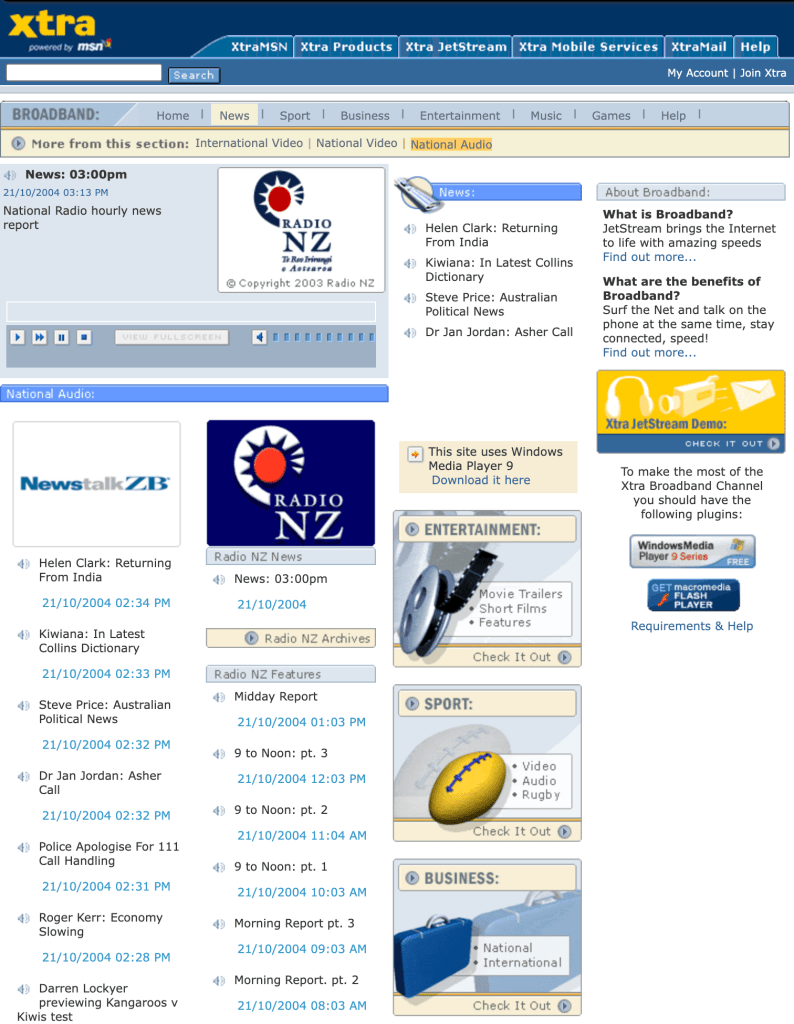
The audio functionality on the new RNZ site was to replace the service offered by Xtra (at right). This provided our content in one hour blocks. There was no ability to seek or rewind as this was thought to avoid any copyright issues on the music that was also included in the segments.
The audience found this very annoying because if you wanted to hear something at (say) 10:50am you had to play 50 minutes of audio in real-time to get to the thing you wanted to hear. The quality wasn’t great, and if you missed something you had to go back to the start of the segment and start over.
For the new site, we decided to segment content, dividing shows up into individual stories. This would allow people to get what they wanted right away, and avoid any music that was broadcast in between items.
One of the first choices we had to make was what audio formats to use.
Windows Media was initially chosen for the live streaming format because this would work out-of-the-box without any intervention for the vast majority (98%) of our visitors. We wanted people to feel confident to use the site, and (given the limited number of staff) we wanted to reduce the number of people emailing and calling for help as much as possible. Remember, this was 2005, long before ubiquitous low-cost streaming options.
This was changed to a fully cross-platform service run by StreamGuys, in 2008/9.
The on-demand format was MP3, but served via a Windows Media Server.
At the time there was no other public broadcaster segmenting entire programmes, a feature that not only helped us avoid problems with music licensing, but also facilitated tagging and content suggestion. (Yes, tagging was thought of in 2006/7.) This paved the way for the release of seven podcasts in April 2006. It is hard to comprehend now that some staff were still struggling with the relevance of the internet to RNZ, let alone podcasts!
We used the MP3 format for on-demand listening because the same file could be used for the podcast feeds. Ogg Vorbis was added later to provide a patent-free open format, and this also played natively in the Firefox browser.
A choice was made in 2008 to keep as much audio as possible, with a view to creating a permanent record of life in New Zealand, and to use as the basis for new features. A few years after this I signed a deal to send the metadata for all audio to the National Library, making it searchable via the DigitalNZ site, and later with AudioCulture, to embed our audio on their site. This was the start of RNZ’s many content sharing agreements.
Music on the site was initially a problem, due to copyright, and quite some time was spent talking with industry representatives to work through the issues. RNZ’s position was that music documentaries were not a substitute for buying records, and that they promoted music in a way that was beneficial to the industry as a whole. Smaller labels quickly understood this, and were keen to have their band’s material appear on the site. This spawned the NZ Live sessions, which featured original RNZ recordings that could be hosted online.
Another choice was our hosting arrangement for audio. Because of exorbitant local bandwidth pricing, RNZ audio content was hosted in San Francisco, with mirrors in Auckland, and Wellington. Most kiwis got their audio via the US site because of local ISPs insane traffic routing policies, even though it was available locally.
I was once told privately (off-the-record, by an insider) that the cost of the international bandwidth for ISPs to import this content was around $1 million per annum, so it seems even stranger that local ISPs would eschew getting a free feed of the data. I did talk about this at the New Zealand Network Operators’ Group annual conference one year, showing how local ISPs could get access to the audio for free, but only tier two ISPs seemed willing to take up the offer.
In 2010 the audio hosting were moved back to New Zealand, and we started self-hosting our own servers too. This choice was made to reduce hosting costs, and to allow the use of fast local dark fibre connections. This approach to connectivity, and a very fast CMS, was what allowed the RNZ to be the fastest loading media site in NZ for over 10 years. I covered this in detail in a previous post in 2007.
The storage of audio files was decoupled from the main site, with the CMS having a reference to the storage path. The base URL was configurable, allowing this to change as needed, and the ELF-marks rendering system allowed the URL to be rewritten on the fly as needed. This allowed for audio to be hosted anywhere, and this is an option RNZ took up some time after I left.
I was an advocate for publishing pre-recorded programmes as soon as they were ready. Shows like Our Changing World, Country Life and Insight were three examples. There was a concern that if we published them earlier than broadcast, that this would cannibalise our radio listenership. My argument was that the web audience is not the same as the on-air audience, and while there was some overlap, not all radio listeners used the site anyway! It wasn’t until about 2014/15 that RNZ started pre-publishing shows of this type.
An interesting audio feature that was planned but never released was a ‘surprise me’ feature for audio. The premise was that you entered the amount of free time you had (say, 10 minutes) and the system would serve you up some random piece of (good) audio close to that length.
This was one of many audio features I had in the pipeline with the intent to capitalise on RNZ’s unique content. I will cover this more in my final post of the series, which looks at growing the audience.
RNZ Player
The RNZ audio player was designed to open in a new window, allowing people to keep listening to audio while they browsed, and even if they left the site. This is exactly how the radio works in real life. It does not make sense to play audio on a page, and for that audio to stop if the person browses away.
When SoundCloud came out with their on-page player that persisted as you moved around the site, there was a push from some people to do the same at RNZ. Such a change would have required very careful design, and at the time, a complete rewrite of front-end code for the site.
From my perspective it broke the Keep It Simple Stupid (KISS) principle. We already had many calls from people who struggled to use some basic features on the website, and I did not relish getting calls from people asking why the audio stopped playing when they closed a window, or clicked on a link. So we didn’t do it.
The other feature of the player of the 2013 version of the player was that it supported a playlist, and this persists via use of a browser cookie. The playlist could be stopped and resumed at any time, and if closed, could be reopened by going back to the RNZ site.
The first version of the player used a small hidden Adobe Flash element to play the audio, and it would switch to an HTML5 player if that was available. At some stage all browsers supported the HTML5 player, and we removed the Flash player.
Audio Publishing
Audio was edited and produced on a system called CoSTAR. It shipped with a very basic software written in Visual Basic that exported audio that was dropped into a folder as an MP3. For mass publishing of audio and its associated metadata this was quite inadequate, so we extended the software script to extract metadata from the system into an XML file. Sadly, the script used to crash and we were unable to debug it beyond ascertaining that the crash always happened just before the final End statement.
The other issue was that Windows did not natively support secure transfer of the files to the CMS or media servers.
Really nerdy bit: The script was ported to the Perl programming language, which has a Win32::OLE module for accessing the Windows COM interface, we installed Windows ports of SSH and SCP, and we were away laughing. The Perl version of the script ran in a loop, just like its VB predecessor, but would run without crashing on its own.
This outbox was extended over time to allow the addition of branded images to our audio files, tagging, transcoding to Ogg Vorbis, and it was eventually ported to Ruby.
The publishing software converts the metadata entered into the CoSTAR system into XML, as well as embedding information and an image into the audio file before uploaded this to the audio servers. The software was fully configurable, allowing each programme to have different audio quality settings if needed. In the early days speech only programmes were coded at a lower rates and music at a higher rate. As more people started to use podcasts in general, there was a demand for better quality files all round, and the rate was increased for everything.
The publishing process was so streamlined that it was possible to get a broadcast interview onto the site within five minutes of broadcast. It was so fast that some programmes were published to the site before they had finished playing on air! Actually, this is possible because some content is pre-recorded, and goes live on the site at the start time of broadcast.
Programmes
Every radio show, documentary or series had its own page. Some of these are automatically populated with content from the latest schedules, such as Mornings on RNZ Concert. Others, such as Nine to Noon on RNZ National had a page for each day’s show. Any show with audio has its own podcast page and feeds which are automatically populated as audio is published.
None of these are actual ‘real’ pages in the traditional sense of being coded and sitting on a server waiting to be requested. All of these pages are compiled on the fly from information in the CMS, based on the date or other information, and presented via a handful of templates. This ensures consistency, and there is a lot of automation (with some manual overrides) for how content is displayed to make like easier for producers. The aim was to get the system to make good choices automatically as often as possible, but to allow human intervention to tweak how stories were presented if needed.
That was one benefit of a custom-built system—being able to provide templates for common objects in the system, with these being automatically used any time a new programme is created. It is a powerful and flexible approach because it is easy to set up new programmes, and it is possible to globally make changes to the layout without having to go into hundreds of pages manually.
This templated approach is used for just about everything on the site, even sections of pages.
Schedules
The schedule pages take a similar approach, with templates being used to render raw schedule data. A single template is used for the daily schedule page, and a second for the weekly page, for both stations.
As with programmes, what data is displayed based on the date coded in the URL, which is in this format:
/station/schedules/yyyymmdd
The rendering of date navigation is also automatic, based on the data available in the system. Historical schedules back to 13 Jan 2007 were kept.
The schedules sections of both stations saw a massive jump in traffic numbers after The New Zealand Listener stopped publishing full schedules. This drove a lot of innovation as we got feedback from visitors about struggles they were having. The biggest of these was automatic PDF generation on-demand, in different formats and sizes.
The RNZ Pacific schedules are a special case—these are based on two ‘standard weeks’, one for Daylight Time and one for Standard Time.
Static Pages
The ELF CMS does have a section for more traditional content, such as ‘about’ and ‘contact’ pages. A more traditional CMS has a page-centric view of the world which focussed on on content of this this type. On the RNZ sites other types of content were far more important, so that is where the most functionality was created. This type of content was infrequently changed, so a much simpler interface was needed. This underlines the general approach of only building what was needed.
In the next part, I will explore all things news.


 Stuff I'M Thinking About
Leave a comment